Remote Control or AI Personal Assistant — Two Philosophies
Claude Code Remote Control is a remote for your AI programmer. Start a session on your machine, control it from anywhere — phone, tablet, browser. Everything runs locally. Controlled, secure, specialized.
OpenClaw is an AI personal assistant that works for you 24/7. You control it via WhatsApp, Telegram, or Discord — emails, Jira tickets, smart home. Boundless, autonomous, generalist.
Not a comparison between competitors — but between two fundamentally different approaches.
Note: As of February 25, 2026. Features, pricing, and security status may have changed since then.
Transparency: I use Claude Code daily and consult companies on AI workflow adoption. No commercial relationship with Anthropic or OpenClaw.
Quick Overview
| Category | Claude Code RC | OpenClaw |
|---|---|---|
| Code writing/reviewing | Excellent | Possible, but cumbersome |
| 24/7 operation | Terminal must stay open | Daemon mode |
| Interface quality | Claude App (Markdown, Code) | Chat apps (limited) |
| Data security | Outbound HTTPS, TLS | Critical vulnerabilities |
| Cost | $20-200/month (flat rate) | $27-600+/month with Opus API |
| Setup effort | Minimal | Complex (Docker/WSL) |
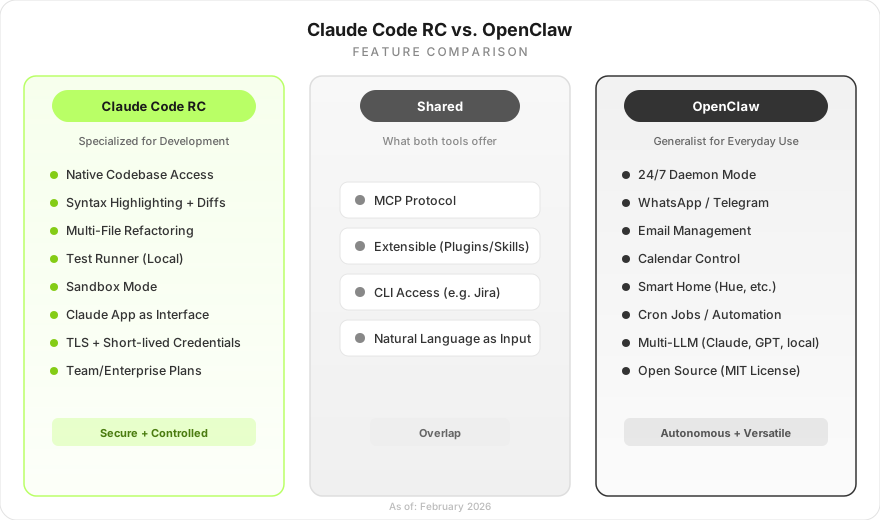
What Is Claude Code Remote Control?
Claude Code Remote Control was released on February 24, 2026. You start a session in the terminal with claude remote-control (or type /remote-control in the Claude app). The session automatically appears on your phone. The whole experience feels like a normal Claude chat in the app — except your local machine does all the heavy lifting in the background.
Your filesystem, your MCP servers, your Git repos — everything stays accessible because nothing goes to the cloud. The Claude App renders Markdown, code blocks, and diffs natively — a massive advantage over chat-based assistants like OpenClaw on Telegram.
What works:
- Control sessions from anywhere (phone, tablet, browser)
- Full access to local filesystem, MCP servers, tools
- Auto-reconnect after network interruptions
- Sandbox mode for controlled execution
What doesn’t (yet):
- Only one remote session per terminal
- Terminal must stay open — no daemon mode
- No parallel tasks in the same chat
Availability: Research Preview for Max subscribers ($100-200/month). Pro support ($20/month) announced.
What Is OpenClaw?
OpenClaw (formerly Clawdbot) is an open-source project by Peter Steinberger. A personal AI assistant that runs on your hardware around the clock. You text it on WhatsApp: “What’s on my calendar today?” — and it answers. With Claude, GPT, or a local model of your choice.
The revolutionary part: OpenClaw is always-on. Summarize your emails at 6 AM? Automatic. Sprint report from Jira every Friday? No problem. Over 50 native integrations (Gmail, Todoist, GitHub, Spotify, Philips Hue) and 3,000+ community skills on the ClawHub Marketplace.
Comparison 1 — Development
Claude Code started as a coding agent — but it can do much more now: research, data analysis, content creation, workflow automation via MCP servers. And with Claude Cowork, there’s a second approach from Anthropic aimed at non-technical users: desktop automation without a terminal, processing PDFs, editing documents. The Anthropic ecosystem is growing beyond pure coding.
Still, development remains the core strength: understanding codebases, refactoring across multiple files, running tests. OpenClaw can write code, but without codebase context and with chat apps as the interface, it’s unsuitable for serious development.
Practical example: You’re migrating an API endpoint from Express to Hono. With Claude Code RC, you start the session, go to lunch, open the app on your phone — Claude has changed 4 files, tests pass. “Looks good, commit please” — done. With OpenClaw on Telegram, you get a generic code snippet without syntax highlighting that you need to manually copy into your IDE.
Winner: Claude Code RC — clear winner for everything development-related.
Comparison 2 — Jira Automation
Jira works excellently via CLI — and both systems can handle that. Claude Code can use the Jira CLI directly in the terminal or work through MCP servers. OpenClaw has a native Jira skill with natural-language-to-JQL.
The difference isn’t in whether but in when: Claude Code needs an active session. OpenClaw runs 24/7 and can build automated workflows — a ticket summary every morning at 8 AM, automatically creating a ticket when a bug email arrives, at 3 AM without anyone being awake.
The fundamental difference: Claude Code = you actively control. OpenClaw = it acts autonomously.
Winner: Nuanced. OpenClaw has the better vision (24/7 automation), Claude Code the safer practice.
Comparison 3 — Office Tasks
OpenClaw was built for this: A personalized daily briefing on WhatsApp at 6:30 AM — weather, calendar, top tasks, prioritized emails. You reply “Cancel my 10 o’clock meeting” — done.
Claude Code RC is a coding agent. It has no access to calendars, emails, or fitness trackers. Period.
Winner: OpenClaw, clearly. Currently recommended for testing with isolated VMs and test accounts.
Security and Maturity
An important distinction: Claude Code RC runs in a controlled environment — outbound HTTPS requests, TLS, short-lived credentials, no open ports. Anthropic offers DPA and enterprise compliance.
OpenClaw as an open-source project is still in an early phase. In February 2026, security teams documented vulnerabilities (including unprotected instances and problematic community skills). This is typical for young open-source projects and not a fundamental problem with the concept — but a matter of maturity. Anyone experimenting with it today should use an isolated VM with test accounts. For both tools: GDPR review is mandatory, more complex with OpenClaw due to its decentralized architecture.
Cost Comparison
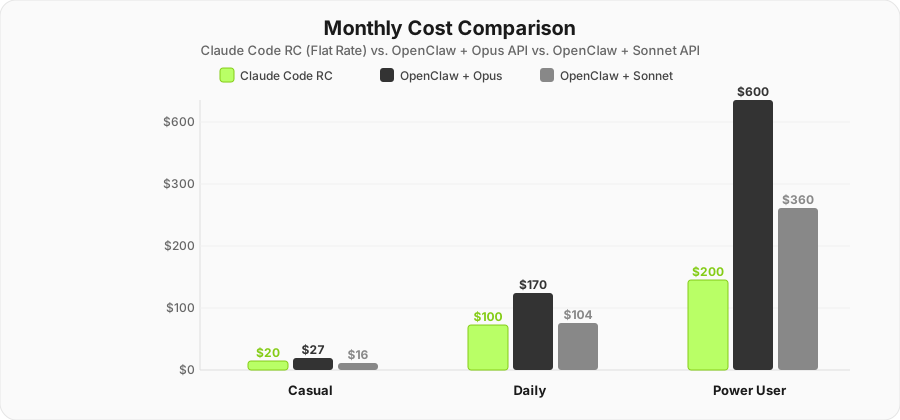
Claude Code RC: Flat Rate
- Pro: $20/month — Claude Code in the terminal, RC coming soon
- Max 5x: $100/month — Remote Control available
- Max 20x: $200/month — Priority Access
Complete product, no server setup, no API keys to manage.
OpenClaw: Free* (*it’s complicated)
Open-source (MIT), but API costs are underestimated. You need separate API keys — the Claude subscription doesn’t cover OpenClaw.
| Scenario | Claude Code RC | OpenClaw + Opus | OpenClaw + Sonnet |
|---|---|---|---|
| Casual user | $20/mo (Pro) | ~$27/mo | ~$16/mo |
| Daily assistant | $100/mo (Max 5x) | ~$170/mo | ~$104/mo |
| Power user / 24/7 | $200/mo (Max 20x) | ~$600/mo | ~$360/mo |
| Team (5 people) | $125/mo (Team) | ~$850-3,000/mo | ~$520-1,800/mo |
| Setup effort | 5 minutes | 1-3 hours | 1-3 hours |
Plus for OpenClaw: hosting ($0-20/mo), server maintenance, security hardening, no support.
Enterprise Check
Claude Code RC scores on control: sandbox mode, TLS, part of the Anthropic stack with team/enterprise plans. Still Research Preview (no SLA), but excellent in practice for developer teams.
OpenClaw is not an enterprise tool today — it lacks SOC2, audit trails, and RBAC. But the concept of an autonomous AI assistant handling routine tasks 24/7 is exactly what companies need long-term. The question isn’t whether but who will implement this concept in an enterprise-ready way.
My recommendation as an AI Workflow Consultant:
- Developer teams: Claude Code. Ready to use immediately, controllable.
- Company-wide AI automation: Keep the OpenClaw concept on your radar — enterprise-ready variants will come.
- Innovation labs: Try OpenClaw on an isolated machine to identify use cases.
Conclusion — Remote Control or AI Personal Assistant?
| You need… | Recommendation | Why |
|---|---|---|
| Write, review, deploy code | Claude Code RC | Specialized, secure, excellent interface |
| Automate Jira tickets | Claude Code + MCP | Controlled, enterprise-compatible |
| 24/7 automation / daily briefing | OpenClaw (isolated) | Visionary concept, ideal for experimenting |
| Enterprise use (today) | Claude Code | Control, compliance, ecosystem |
| Non-technical users | Claude Cowork | Desktop automation without terminal |
The Concept Is the Real Story
Claude Code RC is the better product today — mature, secure, ready to use. But OpenClaw shows where the journey leads. An autonomous AI assistant that prioritizes emails around the clock, creates tickets, manages calendars, and acts proactively — that’s not a niche product, that’s the future of knowledge work.
It’s only a matter of time before this concept hits the market in enterprise-ready form. The candidates are lined up: Anthropic is building in exactly this direction with Claude Cowork and the Enterprise API. Google has the perfect platform for it with Gemini and the Android ecosystem. And then there’s Apple — the long-awaited Siri update with Apple Intelligence could be the moment the “AI personal assistant” goes mainstream. Apple has what OpenClaw lacks: a closed ecosystem, hardware integration, and the trust of billions of users when it comes to privacy.
Today: Remote control for work, OpenClaw for experimentation. Tomorrow: The AI personal assistant will be as natural as the smartphone is today.
Sources and further reading:
Frequently Asked Questions
What is the main difference between Claude Code Remote Control and OpenClaw?
Claude Code Remote Control is a remote for your local coding agent — you actively control a terminal session from your phone or tablet. OpenClaw is an autonomous AI personal assistant that runs 24/7 on your server, independently handling tasks like emails, Jira tickets, and smart home.
Is OpenClaw safe for production use?
As of February 2026, OpenClaw has documented security vulnerabilities: WebSocket hijacking (CVSS 8.8), publicly accessible instances without authentication, and malicious community skills. OpenClaw is currently not recommended for production business data — only for experiments on isolated machines.
What does OpenClaw really cost compared to Claude Code?
Claude Code costs $20-200/month as a flat rate. OpenClaw is open-source, but API costs (e.g., Opus 4.6) run $27-600+/month depending on usage intensity, plus hosting costs and maintenance overhead.
Can Claude Code Remote Control also manage emails and calendars?
No, Claude Code Remote Control specializes in development tasks. It has no native access to emails or calendars. For office automation like daily briefings, email management, and calendar control, OpenClaw is the better choice — though with the mentioned security caveats.
Which tool is suitable for enterprise use?
Claude Code is the safer choice: controlled environment, TLS encryption, team and enterprise plans with compliance guarantees. OpenClaw offers no enterprise governance (no SOC2, no RBAC, no audit trails) and is currently not recommended for production environments.